Home Assistant
Works with conditions
Reviewed guide
A documented connection is available. Check its equipment, account, firmware and feature requirements.
Home Assistant via Shelly over Wi-FiGetting specifications, connection paths, and resources ready.
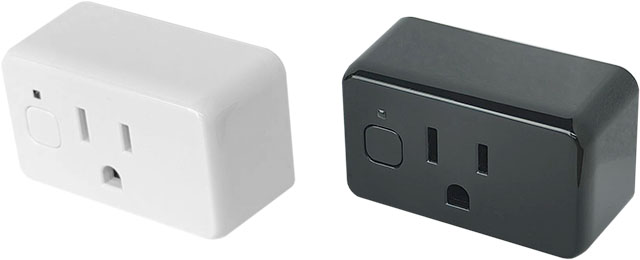
Model: S4PL-00116US
A compact US smart plug with power and energy monitoring, device schedules and local Wi-Fi control. Zigbee mode can relay Zigbee traffic; Matter and Home Assistant use their own connection paths.
Catalog-level details. Controllers, bridges, accounts, and available features depend on the connection route.
Shelly USA (official store). Confirm the exact variant before choosing. Store prices and availability can change; product-information pages are not store offers.
What to know about this device before choosing a connection.
A recommendation is not recorded yet. Compare the requirements below with your home and the capabilities you need.
Exact US model technical/API documentation rechecked October 10. Zigbee router, Wi-Fi extender and BLE gateway are separate functions. Matter is the default profile; five control-button presses select Zigbee and start inclusion for three minutes. BTHome components are unavailable in Zigbee mode. Local Wi-Fi/Home Assistant does not need Shelly cloud; exact HA meter entities and simultaneous-mode behavior remain unverified. Compact design, 20 device-firmware schedules and a 15 A AC output limit are documented. The 1800 W figure applies to resistive loads. Product scheduling does not establish identical options through Home Assistant, Matter or Zigbee. Existing mode-specific network behavior, meter-entity limits and firmware unknowns remain in the connection guides.
Check your ecosystem, then choose a connection method for its requirements and available controls.
A listed ecosystem is a starting point. Connection methods and exposed capabilities must be checked for the exact variant.
Reviewed guide
A documented connection is available. Check its equipment, account, firmware and feature requirements.
Home Assistant via Shelly over Wi-FiCatalog listing only
Compatibility has not been established for this exact model. This does not mean it is incompatible.
Catalog listing only
Compatibility has not been established for this exact model. This does not mean it is incompatible.
Catalog listing only
Compatibility has not been established for this exact model. This does not mean it is incompatible.
Catalog listing only
Compatibility has not been established for this exact model. This does not mean it is incompatible.
No verified evidence yet
Compatibility has not been established for this exact model. This does not mean it is incompatible.
No verified evidence yet
Compatibility has not been established for this exact model. This does not mean it is incompatible.
Missing documentation does not mean a device is incompatible. Reviewed documentation is not a physical hardware test.
Basic controls on the reviewed connection. Setup, remote access, voice services and firmware updates have separate requirements.
S4PL-00116US · US · Documentation reviewed. Check the unit’s hardware and firmware before setup.
Documented controls may have firmware or configuration conditions. Read the guide before relying on a feature.
Open setup guideInstallation & device requirements · Manuals & resources · All connection details
Choose a documented method. Requirements, controls, local/cloud behavior, and evidence stay attached to that route.
Home Assistant · US · S4PL-00116US
Documentation reviewed · 10/18/2026. Not tested on physical hardware.
Plug US Gen4
Home Wi-Fi
To Shelly integration
Shelly integration
To Home Assistant
Home Assistant
Complete the required items before setup. Items marked “Not required” are optional for this route.
Documented
Shelly Plug US Gen4, S4PL-00116US, US variant.
Derived from documentation
The plug must join Wi-Fi and be reachable from the Home Assistant host.
Documented
You need an existing Home Assistant installation and access to its settings.
Documented
Use Shelly in Devices & services. No community add-on is part of this route.
Not required
Not required: the plug communicates directly with Home Assistant over your network.
Documented
Use the plug’s local web interface: connect to its ShellyPlugUSG4 access point and open 192.168.33.1. Configure your home Wi-Fi, then reconnect your phone or computer to that network.
Documented
Accept discovery, or open Settings → Devices & services → Add integration → Shelly. Enter the plug’s LAN address if prompted.
Derived from documentation
Open the device and check its switch entity. Confirm the outlet responds before building automations.
Derived from documentation
One relay maps to a switch by default; derived from the device component and integration documentation.
Not yet verified
The device has a meter. Exact Home Assistant entities for this model have not been verified in this review.
Documented
Local communication; no Shelly cloud connection needed.
Documented
Separate Home Assistant remote access is needed. Cloud and VPN options have their own requirements.
Derived from documentation
A rule using this local switch can run on your Home Assistant host. Cloud-based triggers or actions add their own dependencies.
Not yet verified
The integration offers an update action; a fully offline update process was not verified.
Not yet verified
An exact minimum version for this Gen4 model is unverified. Review the current enhanced-security guidance if connection setup fails.
Documented
Built into Home Assistant and documented by its maintainers.
Derived from documentation
A short configuration task when Home Assistant and Wi-Fi are already running; host installation and network troubleshooting are additional work.
Shelly · manufacturer · Checked 2026-10-10
Identifies S4PL-00116US and its 2.4 GHz Wi-Fi radio, web interface and power meter.
Source location: Device identification; connectivity; specifications
Shelly · manufacturer · Checked 2026-10-03
The plug works on local Wi-Fi without Shelly Cloud. Its setup access point provides the local web interface at 192.168.33.1; after joining home Wi-Fi use the assigned LAN address.
Source location: Page 1, English: Product description; Embedded Web Interface; Initial inclusion
Shelly · manufacturer · Checked 2026-10-10
The Gen4 plug exposes one relay channel through switch:0, with Wi-Fi and a built-in power meter.
Source location: Device description and component list
Home Assistant · platform · Checked 2026-10-10
The built-in integration supports all four generations. Gen2+ uses RPC directly without cloud. Devices can be discovered or added by host address. Relays become switch entities by default. HTTPS behavior changes with enhanced security.
Source location: Configuration; device generations; Gen2+ configuration; consumption type; enhanced security; OTA update
Compare the documented support source and effort for each route. Official/community support and local/cloud operation are separate questions.
Built into Home Assistant and documented by its maintainers.
Check status & evidenceA short configuration task when Home Assistant and Wi-Fi are already running; host installation and network troubleshooting are additional work.
Check status & evidenceSee how it can help your network and which other connection functions it offers. Each answer applies to its documented protocol and operating mode.
✓ Zigbee router
Helps relay Zigbee traffic for other devices when operating in this mode.
Shelly identifies this exact US plug as a Zigbee router. The role applies when the plug operates on a Zigbee network; Wi-Fi extension and BLE gateway functions are separate.
Shelly identifies this exact US plug as a Zigbee router. The role applies when the plug operates on a Zigbee network; Wi-Fi extension and BLE gateway functions are separate.
Shelly identifies this exact US plug as a Zigbee router. The role applies when the plug operates on a Zigbee network; Wi-Fi extension and BLE gateway functions are separate.
Exact-model evidence has not established this answer.
Documentation reviewed. Not tested on physical hardware.
Each function has its own evidence and operating conditions. Protocol support alone does not establish extension or gateway behavior.
✓ Supported
Can extend Wi-Fi connectivity for compatible devices through its access point. Check configuration and mode conditions below.
Matter and Zigbee operating modes
The exact-model API documentation says five control-button presses select Zigbee and start inclusion for three minutes. BTHome components are unavailable in Zigbee mode. These documented switching steps do not establish simultaneous operation or every hardware/firmware version.
Shelly explicitly lists a Wi-Fi extender function for this exact US plug. Exact setup and simultaneous-mode limits still need verification.
Confidence: high · Last verified: 2026-10-10
The exact device API page says BTHome components are not available in Zigbee mode. This limits the BTHome gateway path; availability of other BLE gateway methods in Zigbee mode remains unverified.
Exact-model Wi-Fi extender, BLE gateway, Matter support and firmware mode selection statements.
Documentation reviewed, not tested on physical hardware. This does not establish every feature exposed through an ecosystem route.
✓ Supported
Can act as a gateway for compatible Bluetooth LE devices. Supported devices and operating modes matter.
Matter and Zigbee operating modes
Choose a connection method for its app, account and controller requirements. An app used by one method is not necessarily required for every connection.
Controllers for the reviewed connections are listed below. These requirements do not apply automatically to other setup methods.
Open connection instructions Find manuals and installation diagramsSetup and software downloads have separate requirements from everyday local control. A completely offline setup has not been established by these summaries.
Requirements apply to this setup method.
Local web setup; Shelly Cloud enrollment is optional.
Check evidenceYou need an existing Home Assistant installation and access to its settings.
Check evidenceUse Shelly in Devices & services. No community add-on is part of this route.
Check evidenceNot required for this local route.
Check evidenceNot required: the plug communicates directly with Home Assistant over your network.
Check evidenceExpand a group to see all recorded attributes. Electrical maxima depend on load type; check operating and installation limits in the exact model documentation. Route-specific feature availability can differ. Missing fields are not a confirmed “No.”
Readings available to your smart-home system depend on the connection. Check readings by connection
Check the model, region, hardware revision, and document version. Connection-specific sources are linked in each guide.
Shelly Plug US Gen4 · S4PL-00116US · Archive started 2026-09-26. Individual additions may be newer. These files open from Dwelleno.
Original manufacturer pageOriginal manufacturer files, including its safety instructions. Diagrams may show different AC and DC configurations; check the exact model and supply type.
Earlier observations checked 9/28/2026. Later observations state their own dates. Certification claims below are attributed to the manufacturer.
For model S4PL-00116US, the manufacturer lists 120 V AC, 60 Hz, maximum switching current of 15 A, and maximum output power of 1800 W for resistive loads only. The page lists resistive, capacitive and inductive load types but does not give those other types a separate output rating.
Manufacturer sourceFor model S4PL-00116US, Matter firmware is the documented default; five rapid button presses switch the device to Zigbee firmware. These are alternative firmware modes, not simultaneous Matter and Zigbee operation.
Manufacturer sourceThe US storefront labels the exact product/model UL-Certified. This records Shelly's storefront claim only; the consulted content does not specify a certificate number or UL standard.
Manufacturer sourceLocal web control is available through the device access point or on the same local network. For Matter setup, the manual requires a compatible hub connected to the Internet. Zigbee setup uses a Zigbee hub and an alternative firmware mode. In Zigbee mode, the access point is off by default; holding the control button for five seconds enables it.
Manufacturer sourceExact US model technical/API documentation rechecked October 10. Zigbee router, Wi-Fi extender and BLE gateway are separate functions. Matter is the default profile; five control-button presses select Zigbee and start inclusion for three minutes. BTHome components are unavailable in Zigbee mode. Local Wi-Fi/Home Assistant does not need Shelly cloud; exact HA meter entities and simultaneous-mode behavior remain unverified.
Manufacturer sourceAdditional exact-model feature check on October 10, 2026: the manufacturer documents compact design, 20 device-firmware schedules and 15 A AC output. Product controls do not establish identical capabilities through Home Assistant, Matter or Zigbee. Existing guides keep their original scope and evidence dates. The 1800 W statement applies to resistive loads.
Manufacturer sourceReviewed documentation, catalog records, and manufacturer observations have different scopes. A source for one capability does not establish every feature.
Connection guides preserve source dates, publishers, review status, and claim-level links. “Documentation reviewed” does not mean tested on physical hardware.
Documentation reviewed Oct 18, 2026 · S4PL-00116US · US
Other active devices in this category. Their connection requirements and capabilities may differ.
10EBO901 · Smart Plugs
The premium Apple Home plug. Thread-native, zero cloud, real-time energy monitoring, full local control. No hub needed if you have a Thread border router (HomePod mini, Apple TV 4K). The best plug for Apple Home users.
Recorded scores: Overall 8.7/10 · Value 7.4/10
Explore connectionsHome Assistant · platform · Checked 2026-10-03
Automations combine triggers, optional conditions and actions. Their external dependencies depend on the selected entities and services.
Source location: Parts of an automation; creating automations
Home Assistant · platform · Checked 2026-10-03
Access from away needs a separate Home Assistant remote-access configuration, such as Home Assistant Cloud or a VPN.
Source location: Remote access options
The exact-model API documentation says five control-button presses select Zigbee and start inclusion for three minutes. BTHome components are unavailable in Zigbee mode. These documented switching steps do not establish simultaneous operation or every hardware/firmware version.
Bluetooth gateway mode limitations
The exact device API page says BTHome components are not available in Zigbee mode. This limits the BTHome gateway path; availability of other BLE gateway methods in Zigbee mode remains unverified.
Shelly explicitly lists a BLE gateway function for this exact US plug. A Bluetooth gateway handles compatible Bluetooth device data; it is a separate function from Zigbee mesh routing. Check the mode limitations below.
Confidence: high · Last verified: 2026-10-10
The exact device API page says BTHome components are not available in Zigbee mode. This limits the BTHome gateway path; availability of other BLE gateway methods in Zigbee mode remains unverified.
Exact-model Wi-Fi extender, BLE gateway, Matter support and firmware mode selection statements.
Documentation reviewed, not tested on physical hardware. This does not establish every feature exposed through an ecosystem route.
✓ Supported
Supports a documented Matter operating mode. Available controls depend on the chosen ecosystem and connection route.
Matter and Zigbee operating modes
The exact-model API documentation says five control-button presses select Zigbee and start inclusion for three minutes. BTHome components are unavailable in Zigbee mode. These documented switching steps do not establish simultaneous operation or every hardware/firmware version.
Shelly documents Matter support and default Matter firmware for this exact US plug. Matter compatibility does not establish a Thread radio, Thread border-router role, or which capabilities every ecosystem exposes.
Confidence: high · Last verified: 2026-10-10
The exact device API page says BTHome components are not available in Zigbee mode. This limits the BTHome gateway path; availability of other BLE gateway methods in Zigbee mode remains unverified.
Exact-model Wi-Fi extender, BLE gateway, Matter support and firmware mode selection statements.
Documentation reviewed, not tested on physical hardware. This does not establish every feature exposed through an ecosystem route.
KP125M · Smart Plugs
Kasa Wi-Fi smart plug with manufacturer-documented Matter and Kasa-app energy monitoring; this reviewed guide covers the local TP-Link integration.
Recorded scores: Overall 8.6/10 · Value 9.4/10
Explore connectionsKasa / TP-Link US (official product information)
PLUGSPLUS · Smart Plugs
The best smart plug for Home Assistant users. Full local control via HTTP/MQTT/WebSockets, real-time energy monitoring, no cloud account needed. Can be scripted directly on the device. The HA enthusiast's plug.
Recorded scores: Overall 8.6/10 · Value 9.1/10
Explore connectionsKP115 · Smart Plugs
Reviewed guides: Home Assistant →
Kasa Wi-Fi plug with energy monitoring in the Kasa app; US electrical ratings are documented separately from other regions.
Recorded scores: Overall 8.3/10 · Value 9.7/10
Explore connectionsKasa / TP-Link US (official product information)
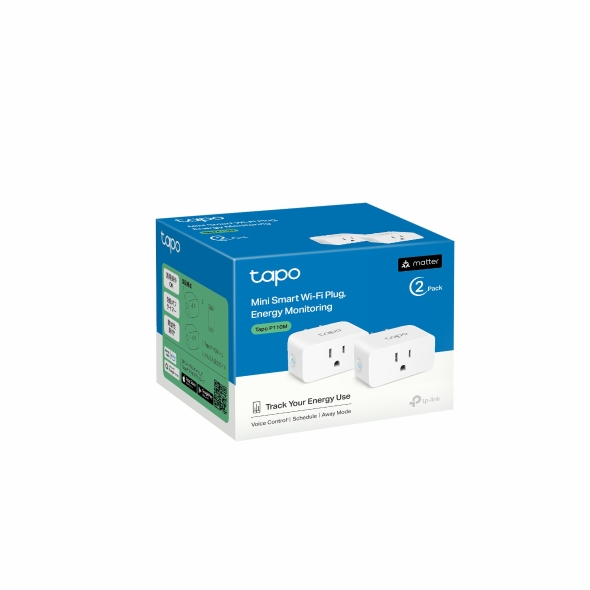
P110M · Smart Plugs
Reviewed guides: Google Home, Home Assistant →
A Tapo Matter-over-Wi-Fi plug with documented energy monitoring. Connection requirements and exposed readings depend on the selected ecosystem, hardware and firmware.
Recorded scores: Overall 8.2/10 · Value 9.2/10
Explore connections